Google Ads for Small Business 2026: A Setup Built for Better ROI

Google Ads works for a small business when you bid on the phrases buyers type, pay only for clicks, and track what each click is worth. Seed Light sets up conversion tracking, tight ad groups and negative keywords first. That is where most small budgets leak before a single sale is counted.
Key takeaways
Short on time? Here is the whole guide to Google Ads for small business in five lines before we break it down.
- Google Ads buys attention fast. Unlike SEO, you can be at the top of the page today, but you pay for every click.
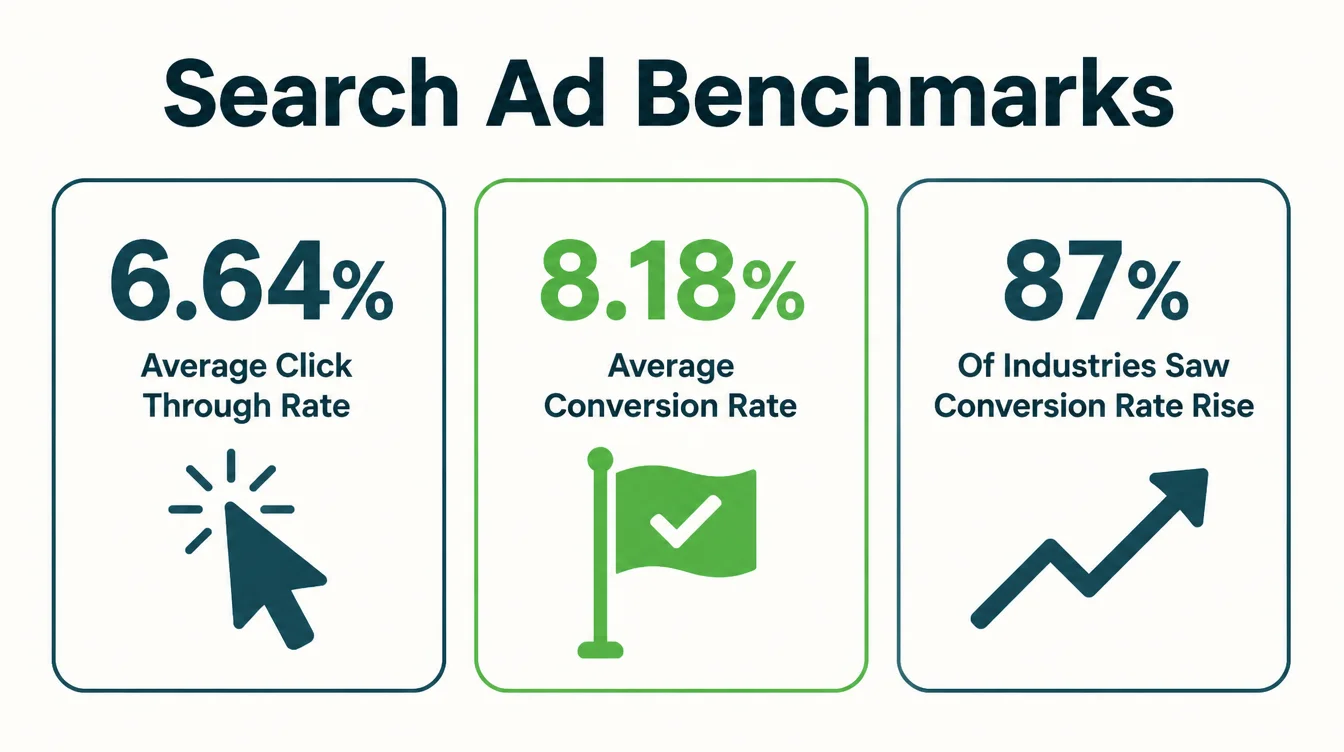
- It works when intent is high. Across industries the average search ad gets a 6.64% click-through rate and an 8.18% conversion rate (WordStream 2026 benchmark study).
- Most waste is avoidable. Broad keywords, no negatives, and your homepage as a landing page are where budgets leak.
- Ad quality lowers your cost. Higher quality ads can often lead to lower costs per click (Google Ads Help, 2026).
- Set up the seven essentials first. Then watch week one closely and only keep spending where the math works.
1. How Google Search ads actually work
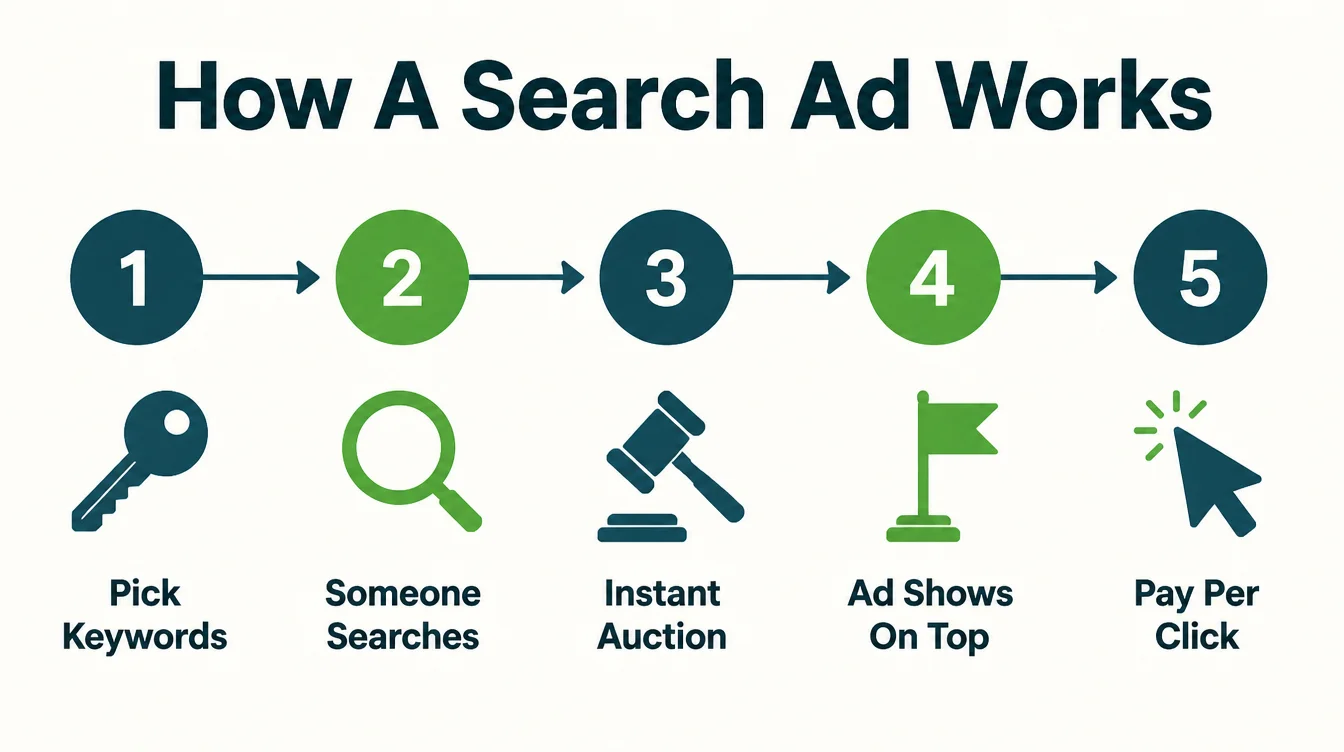
Google Ads sounds complicated. It is not. You pick the phrases people type into Google, and when someone searches one of them, your ad can show at the top of the page. Then you pay only when someone clicks. No click, no charge.
Behind the scenes, every search runs a tiny auction in a fraction of a second. Google looks at who is bidding on that phrase, how much they bid, and how good their ad is.
Then it ranks the ads. Importantly, the highest bid does not always win, because Google also weighs how relevant and useful your ad is.
That last part matters more than most owners realise. Ads buy the top spot you have not earned through SEO yet, and the top spots get most of the clicks.
In organic search, the number one result has a click-through rate of 27.6%, and the top three results get 54.4% of all clicks (Backlinko, 2026). Ads put you in that prime real estate before you have built the rankings to deserve it.
2. When Google Ads is worth it (and when it is not)
Google Ads is not right for everyone. So before you spend a cent, check whether your situation fits. Two things decide it: demand and value.
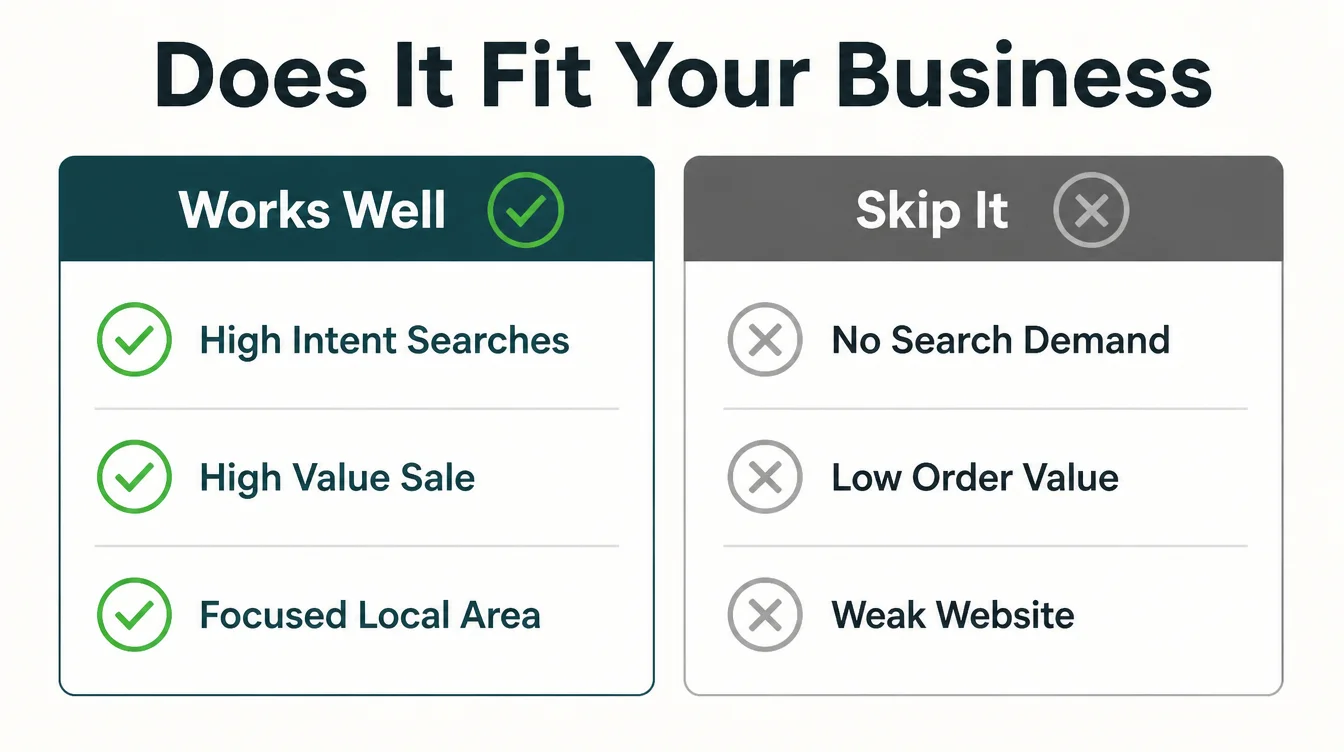
Demand means people already search for what you sell. If folks type "emergency plumber near me" all day, there is intent to catch. Value means one customer is worth a lot more than one click, so a handful of wins pay for the clicks that miss. When both are true, ads tend to work.
When it usually works
- High intent services. Plumbers, dentists, lawyers, locksmiths. People search when they need you now. A website for a professional practice that shows credentials and a clear way to call turns those clicks into enquiries.
- Clear, valuable offers. A booking, a quote, or a sale worth real money, so a few conversions cover the spend.
- A focused area. You serve a defined region, so you are not bidding against the whole country.
When it usually does not
- No search demand. If nobody searches for your product, there is nothing to bid on. Social ads may suit you better.
- Tiny order value. If each sale is worth very little, the math rarely works on paid clicks.
- A weak website. Sending paid clicks to a slow or confusing site just speeds up the waste.
Not sure which channel fits you? Our free guide on Google Ads vs Facebook Ads walks through the difference between catching demand and creating it.
If creating demand is the side you need, see how we run Facebook and Instagram ad campaigns. For the bigger picture, start with our pillar guide to digital marketing for small business.
3. What results to expect
Let me set honest expectations, because this is where most owners get burned. Numbers swing wildly by industry, so treat any benchmark as a rough guide, not a promise. Still, the averages give you a sense of normal.
Across all industries, the average Google search ad earns a 6.64% click-through rate and an 8.18% conversion rate, and the conversion rate actually increased for a whopping 87% of industries year over year (WordStream 2026 benchmark study). In plain terms, search ads are converting better than they used to, not worse.
Cost is the part owners worry about most. Here is the honest picture: the cost per click has more than doubled over a decade, so ads are pricier than they were (WordStream 2026 benchmark study). However, there is good news too.
Our free cost per lead calculator works out what a lead is costing you today, and our free lead value calculator works out what one is worth, which is the number that decides whether the cost is fine.
So what should you expect month one? Realistically, expect to spend a little to learn a lot. The first weeks are about data, not profit.
Once you know which keywords convert, you cut the losers and feed the winners. Want to know how to judge whether the spend is paying off? Read our sister guide on what a good ROAS looks like.
4. Set up to not waste money: the 7 essentials
Most ad budgets do not fail because Google Ads is broken. They fail because the setup leaks. Below are the seven things that stop the leak. Do them in order before you turn anything on. If you would rather hand this off, see our digital marketing service.
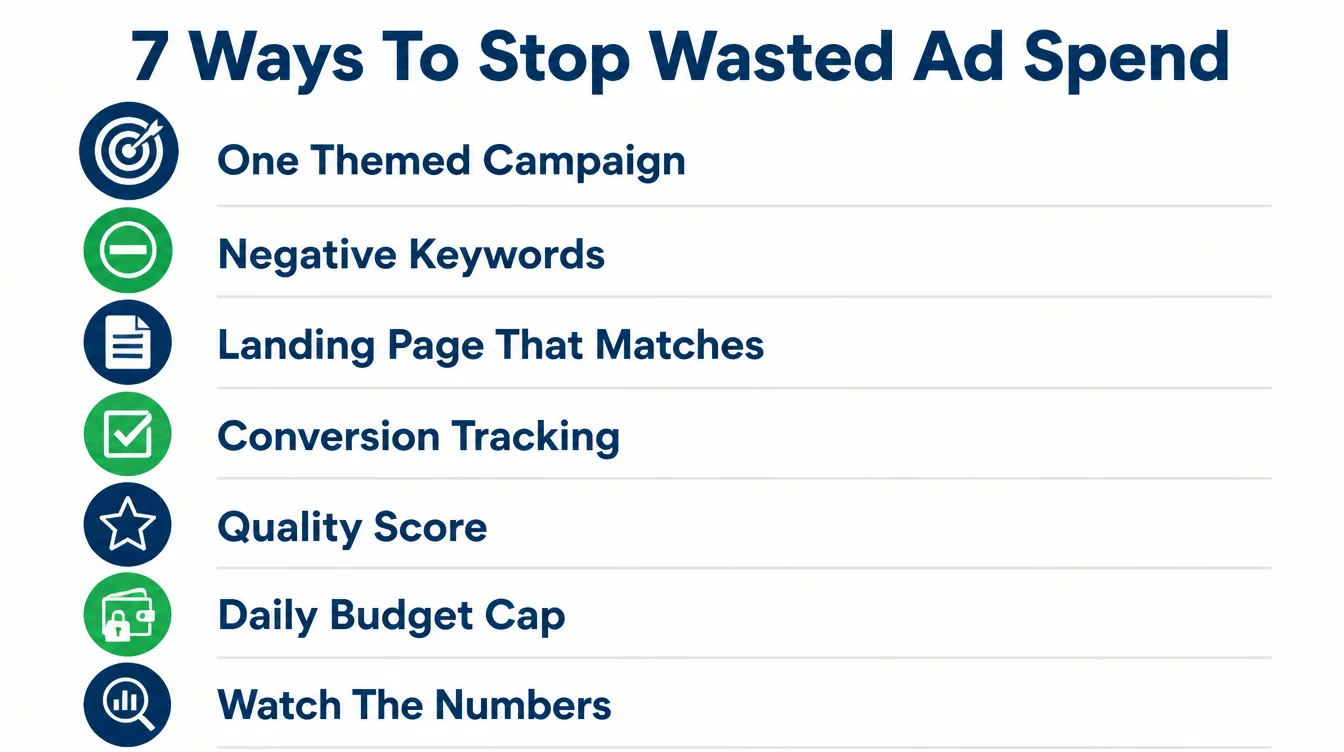
1. One tightly themed campaign
Do not try to advertise everything at once. Pick your single most profitable service and build one campaign around it. A tightly themed campaign is easier to control, easier to read, and easier to fix.
By contrast, a sprawling campaign that sells five things at once hides where the money goes. Start narrow, prove it works, then expand.
2. Tight keywords plus negative keywords
Keywords are the phrases you bid on, and they are where budgets live or die. Choose a small set of tight, high intent phrases that clearly match what you sell. Avoid broad one-word terms that match all sorts of unrelated searches.
Then add negative keywords, the words you tell Google to ignore. If you sell new premium watches, add "free", "repair", "cheap", and "jobs" as negatives so you never pay for those clicks.
This is the single fastest way to cut waste. In week one, check your search terms report daily and add a negative for anything off-target.
3. A real landing page (not your homepage)
This one quietly wastes more money than any other. Your homepage talks about everything, so a paid visitor has to hunt for the thing they searched for. Many just leave. Instead, send each ad to a focused landing page about that one offer, with one clear action.
It also helps your costs, because landing page experience is one of the quality signals Google assesses. A page that matches the search is judged more relevant, and higher quality ads can often lead to lower costs per click.
If your pages are slow or off-message, that is a build problem, and it is fixable. See how we approach conversion-focused pages.
4. Conversion tracking before you spend
Set this up before your first click, not after. Conversion tracking tells you which clicks turned into a call, a form, or a sale. Without it, you are guessing, and guessing is expensive. With it, you can see exactly which keywords earn customers and which just burn cash.
There is a bonus too. Once Google can see which clicks convert, it learns and steers your budget toward similar searches. So tracking measures results and improves them. It is free to set up, and it is the line between running ads and merely buying traffic.
5. Ad quality: what it does to your cost
Google judges your ad on three things: your expected click-through rate, your ad relevance, and your landing page experience.
Quality Score is the 1 to 10 number that reports on those three, and Google says it is a diagnostic tool rather than an input in the ad auction (Google Ads Help, 2026). Read it to find the weak part, then fix the ad and the page.
Here is why it matters to your wallet. Higher quality ads can often lead to lower costs per click, and how much you actually end up paying is often less than your maximum bid (Google Ads Help, 2026).
In other words, being genuinely relevant is cheaper than just bidding more. So match your keyword, your ad text, and your landing page tightly, and your cost drops on its own.
6. Daily budget cap plus watch week one
Set a daily budget cap so a runaway keyword cannot drain your account overnight. Start small, on purpose. The first week is for learning, not scaling, so you want a limited amount at risk while you spot the leaks.
Then actually watch it. Open the account every day in week one, read the search terms report, add negatives, and pause anything obviously wrong. Most of the damage in a new campaign happens in those first days, so a little attention early saves a lot of money later.
7. Only run it when the math works
This is the rule that keeps you sane. Know what one customer is worth to you, then keep spending only while the ads bring customers for less than that. When a campaign earns more than it costs, scale it. When it does not, fix it or switch it off.
It sounds obvious, yet most wasted budgets come from leaving losing campaigns running on hope. Decide your numbers before you start, write them down, and judge every campaign against them. To learn the metric that tells you this, see what a good ROAS is.
| Do this | Why |
|---|---|
| Build one tightly themed campaign | Easier to control, read, and fix than a sprawling one |
| Use tight keywords, add negatives weekly | Stops you paying for searches that were never going to buy |
| Send ads to a focused landing page | Matches the search, lifts conversions, and improves ad quality |
| Set up conversion tracking first | Shows which clicks become customers and helps Google optimise |
| Tighten ad, keyword, and page to match | Higher ad quality can often lead to lower cost per click |
| Cap the daily budget and watch week one | Limits damage while the campaign is still noisy and learning |
| Judge every campaign against your numbers | You only keep spending where each customer costs less than they are worth |
Here is one from our own accounts. We run Google Ads for Ottoman Malaysia, an online custom-fit car mat retailer. The tracking went in first, so every click could be judged against a real conversion instead of a visit.
5. Google Ads vs SEO (you need both)
Owners often ask which they should pick: ads or SEO. The honest answer is both, because they do different jobs. Ads buy attention now. SEO earns it over time. Together they cover the whole journey.
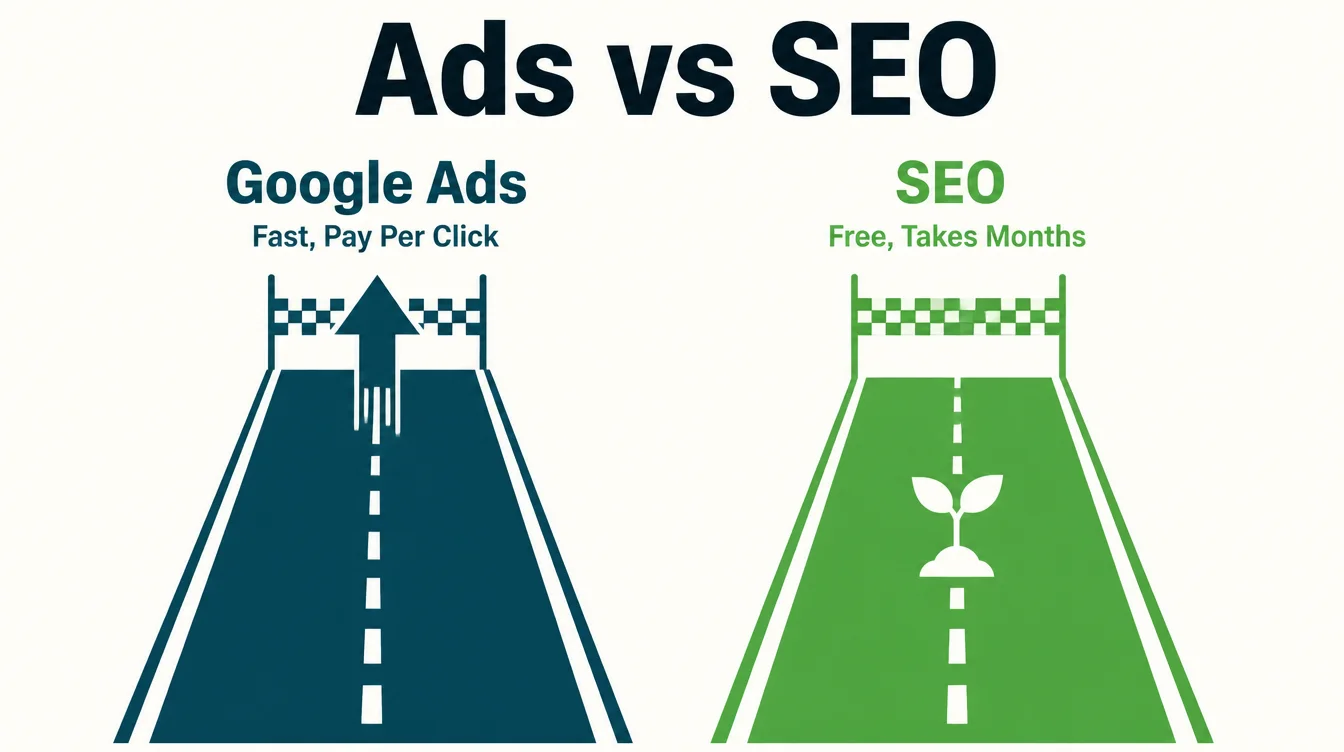
Google Ads is the fast lane. You can sit at the top of the page today, but the moment you stop paying, you vanish. SEO is the slow build. It takes months, yet once you rank, the clicks keep coming without paying per click.
That is why the top organic results matter so much: the number one spot earns a 27.6% click-through rate (Backlinko, 2026), and you keep that traffic for free.
A smart small business uses ads to win customers while SEO ramps up, then leans more on SEO as its rankings grow.
For a full breakdown of when to use each, read our guide on SEO vs Google Ads, and if you want to climb the organic results too, see how to rank higher on Google. For more practical guides, browse the Seed Light blog.
Frequently asked questions
1. Is Google Ads worth it for a small business?
Google Ads can be worthwhile for a small business when people already search for what you sell and one customer is worth enough to cover the clicks that do not convert. It suits offers with high intent and clear value. It is a poor fit when nobody searches for the product or each sale is worth very little.
2. How do Google Search ads work?
You pick keywords, the phrases people type into Google. When someone searches one of them, an instant auction decides which ads show and in what order. You only pay when someone clicks, not when your ad shows. Your position comes from your bid, the quality of your ad and landing page, the Ad Rank thresholds, how competitive the auction is and the context of the search. Better quality ads can often lead to lower costs, so the cheapest path is to be genuinely relevant.
3. Why is my Google Ads budget getting wasted?
Usually because you are paying for clicks that were never going to buy. The big leaks are broad keywords that match unrelated searches, no negative keyword list to block them, sending clicks to your homepage instead of a focused page, and no conversion tracking so you cannot tell which clicks turned into customers. Plug those four holes and most wasted spend disappears. Watch your search terms report in week one and add negatives for anything off-target.
4. What are negative keywords?
Negative keywords are words you tell Google to ignore, so your ad never shows for them. If you sell new luxury watches, you might add free, repair, cheap, and jobs as negatives. That stops people who type watch repair near me or free watch from clicking your ad and burning your budget. Negative keywords are the single fastest way to cut wasted spend, and you should review and add to the list every week when you start.
5. Do I need conversion tracking?
Yes, set it up before you spend a single click. Conversion tracking tells you which clicks turned into a call, a form, or a sale. Without it you are flying blind, guessing which keywords work and which waste money. With it, Google can also learn and send your budget toward the clicks that convert. It is free to set up, and it is the difference between running ads and just buying traffic.
6. How long before Google Ads shows results?
Clicks start the same day, but useful results take longer. Give it two to four weeks to gather enough data before you judge anything, because the first week is noisy. Early on, the work is reading your search terms, adding negatives, and tightening keywords. After that data builds up, you can see which campaigns earn their keep and scale those. Unlike SEO, which takes months, ads buy attention fast, but learning what works still takes a little patience.